> ## Documentation Index
> Fetch the complete documentation index at: https://docs.xentfi.com/llms.txt
> Use this file to discover all available pages before exploring further.
# Master Wallets
> Master wallets are the cornerstone of XentFi's wallet infrastructure. They serve as your primary treasury account, enabling you to manage funds, create deposit addresses, and configure automated settlement rules—all from a single interface.
## Overview
 ## Key Features
Single point of control for all your crypto funds with multi-chain support
Bank-grade security with AES-256 encryption and HSM integration
Live transaction monitoring and comprehensive reporting dashboard
Automated fund distribution based on configurable rules
Support for 7+ major blockchains including Ethereum, Base, and Solana
Handle thousands of transactions with enterprise-grade infrastructure
## Dashboard Overview
## Key Features
Single point of control for all your crypto funds with multi-chain support
Bank-grade security with AES-256 encryption and HSM integration
Live transaction monitoring and comprehensive reporting dashboard
Automated fund distribution based on configurable rules
Support for 7+ major blockchains including Ethereum, Base, and Solana
Handle thousands of transactions with enterprise-grade infrastructure
## Dashboard Overview
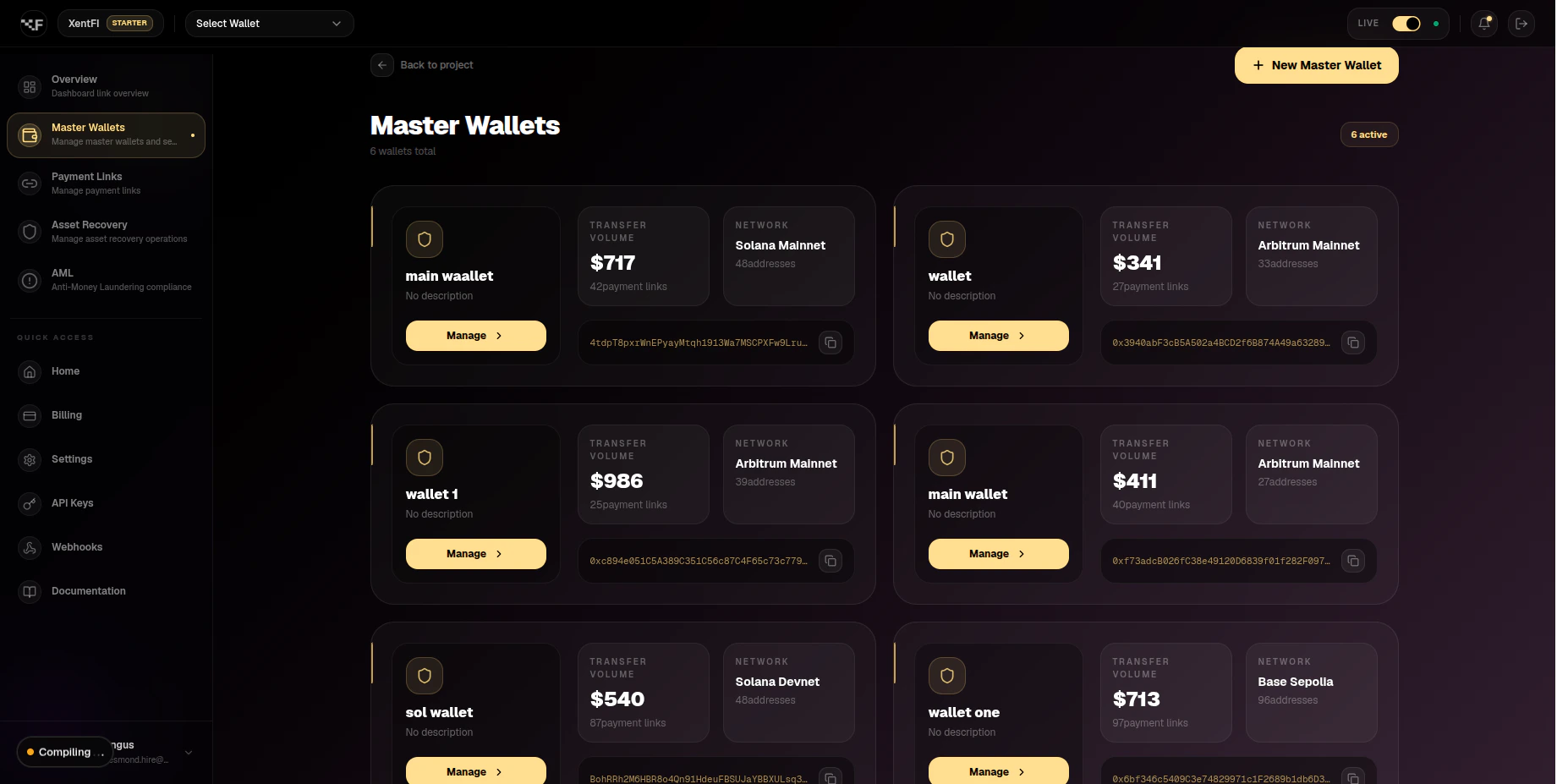
 *The master wallet dashboard provides a comprehensive view of your treasury operations.*
## Supported Blockchains
| Blockchain | Network | Chain ID | Native Token | Avg Block Time | Status |
| ---------- | ------- | -------- | ------------ | -------------- | ------ |
| Ethereum | Mainnet | 1 | ETH | 12-15 sec | ✅ Live |
| Base | Mainnet | 8453 | ETH | 2 sec | ✅ Live |
| Polygon | Mainnet | 137 | POL | 2-3 sec | ✅ Live |
| Arbitrum | Mainnet | 42161 | ETH | 0.25 sec | ✅ Live |
| Optimism | Mainnet | 10 | ETH | 2 sec | ✅ Live |
| BNB Chain | Mainnet | 56 | BNB | 3 sec | ✅ Live |
| Solana | Mainnet | 1 | SOL | 0.4 sec | ✅ Live |
## Prerequisites
Before creating a master wallet, ensure you have:
* ✅ A verified XentFi account
* ✅ API key and App ID from the dashboard
* ✅ Selected target blockchain
* ✅ Understanding of gas fees for your chosen network
## Creating a Master Wallet
### Via API
```bash theme={null}
curl -X POST https://api.xentfi.com/v1/master-wallets \
-H "apiKey: your-api-key" \
-H "orgId: your-org-id" \
-H "Content-Type: application/json" \
-d '{
"name": "Main Treasury",
"blockchainId": "eth-mainnet",
"description": "Primary business treasury",
"enableMonitoring": true,
"enableGaslessWithdraw": false
}'
```
```javascript theme={null}
const { XentFiClient } = require('@xentfi/sdk');
const client = new XentFiClient({
apiKey: process.env.XENTFI_API_KEY,
appId: process.env.XENTFI_APP_ID
});
const wallet = await client.createMasterWallet({
name: 'Main Treasury',
blockchainId: 'eth-mainnet',
description: 'Primary business treasury',
enableMonitoring: true
});
console.log(`Wallet created: ${wallet.id}`);
console.log(`Address: ${wallet.walletAddress}`);
```
```python theme={null}
from xentfi import XentFiClient
client = XentFiClient(
api_key=os.environ['XENTFI_API_KEY'],
app_id=os.environ['XENTFI_APP_ID']
)
wallet = client.create_master_wallet(
name='Main Treasury',
blockchain_id='eth-mainnet',
description='Primary business treasury',
enable_monitoring=True
)
print(f"Wallet created: {wallet['id']}")
print(f"Address: {wallet['wallet_address']}")
```
### Via Dashboard
Log into your dashboard and click **Wallets** in the left sidebar.
Click the **Create Wallet** button in the top right corner.
Fill in the wallet details:
* **Name**: A descriptive name (e.g., "Production Treasury")
* **Blockchain**: Select your target blockchain
* **Description**: Optional description
* **Enable Monitoring**: Toggle for transaction alerts
Review your settings and click **Create Wallet**.
## Response Example
```json theme={null}
{
"data": {
"id": "wallet_123e4567-e89b-12d3-a456-426614174000",
"name": "Main Treasury",
"walletAddress": "0x742d35Cc6634C0532925a3b844Bc9e7595f0bEb0",
"description": "Primary business treasury",
"blockchain": {
"id": "eth-mainnet",
"name": "Ethereum",
"symbol": "ETH",
"chainId": 1,
"logoUrl": "https://assets.xentfi.com/chains/eth.svg"
},
"configurations": {
"monitoringConfig": {
"enabledChains": [
"eth-mainnet"
],
"defaultEnabled": true
}
},
"isActive": true,
"analytics": {
"addressCount": 0,
"paymentLinksCount": 0,
"totalVolume": "0",
"transactionCount": 0
},
"createdAt": "2024-01-15T10:30:00.000Z",
"updatedAt": "2024-01-15T10:30:00.000Z"
}
}
```
## Quick Guide: Wallet Configuration
### Auto-Sweep Configuration
Auto-sweep automatically moves funds from deposit addresses to your master wallet, consolidating funds and reducing gas costs.
```bash theme={null}
curl -X PUT https://api.xentfi.com/v1/master-wallets/{walletId}/auto-sweep \
-H "apiKey: your-api-key" \
-H "orgId: your-org-id" \
-H "Content-Type: application/json" \
-d '{
"enabled": true,
"threshold": "100",
"destinationAddress": "0x742d35Cc6634C0532925a3b844Bc9e7595f0bEb0",
"sweepAll": false
}'
```
```javascript theme={null}
const config = await client.configureAutoSweep({
walletId: 'wallet_123e4567',
enabled: true,
threshold: '100', // USD value trigger
destinationAddress: '0x742d35Cc6634C0532925a3b844Bc9e7595f0bEb0',
sweepAll: false // If true, sweeps all funds regardless of threshold
});
console.log('Auto-sweep configured:', config);
```
```python theme={null}
config = client.configure_auto_sweep(
wallet_id='wallet_123e4567',
enabled=True,
threshold='100',
destination_address='0x742d35Cc6634C0532925a3b844Bc9e7595f0bEb0',
sweep_all=False
)
print(f"Auto-sweep configured: {config}")
```
**Configuration Options:**
| Parameter | Type | Description |
| -------------------- | ------- | ------------------------------------------------- |
| `enabled` | boolean | Enable or disable auto-sweep |
| `threshold` | string | Minimum balance to trigger sweep (in USD) |
| `destinationAddress` | string | Address to sweep funds to |
| `sweepAll` | boolean | If true, sweeps all funds regardless of threshold |
### Testing on Development
#### 1. Set Up Test Environment
Create a wallet on testnet (Sepolia, Mumbai, or Solana Devnet):
```bash theme={null}
curl -X POST https://api.xentfi.com/v1/master-wallets \
-H "apiKey: your-test-api-key" \
-H "orgId: your-org-id" \
-d '{
"name": "Test Treasury",
"blockchainId": "sepolia",
"description": "Development testing wallet"
}'
```
Use public testnet faucets to fund your test wallet:
* **Sepolia ETH**: [sepoliafaucet.com](https://sepoliafaucet.com) or [Alchemy Sepolia Faucet](https://sepoliafaucet.com/)
* **Mumbai MATIC**: [Polygon Faucet](https://faucet.polygon.technology/)
* **Base Testnet**: [Base Faucet](https://base.org/faucet)
* **Solana Devnet**: [Solana Faucet](https://solfaucet.com/)
Check your test wallet balance:
```bash theme={null}
curl -X GET https://api.xentfi.com/v1/master-wallets/{walletId}/balance \
-H "apiKey: your-test-api-key" \
-H "orgId: your-org-id"
```
#### 2. Test Transaction Flow
```bash theme={null}
# Create a deposit address
curl -X POST https://api.xentfi.com/v1/addresses \
-H "apiKey: your-test-api-key" \
-H "orgId: your-org-id" \
-d '{
"masterId": "wallet_123e4567",
"name": "Test Customer Address"
}'
# Send test funds to the deposit address using a public faucet
# Monitor transaction
curl -X GET https://api.xentfi.com/v1/addresses/{addressId}/transfers \
-H "apiKey: your-test-api-key" \
-H "orgId: your-org-id"
```
```javascript theme={null}
// Test flow with SDK
async function testWalletFlow() {
// 1. Create deposit address
const address = await client.createDepositAddress({
masterId: 'wallet_123e4567',
name: 'Test Customer Address'
});
// 2. Monitor for incoming transfers
const transfers = await client.listAddressTransfers({
addressId: address.id,
txType: 'incoming'
});
console.log('Transfers:', transfers);
// 3. Test auto-sweep
const sweepResult = await client.triggerAutoSweep({
addressId: address.id
});
return { address, transfers, sweepResult };
}
```
```python theme={null}
def test_wallet_flow():
# 1. Create deposit address
address = client.create_deposit_address(
master_id='wallet_123e4567',
name='Test Customer Address'
)
# 2. Monitor for incoming transfers
transfers = client.list_address_transfers(
address_id=address['id'],
tx_type='incoming'
)
print(f"Transfers: {transfers}")
# 3. Test auto-sweep
sweep_result = client.trigger_auto_sweep(
address_id=address['id']
)
return address, transfers, sweep_result
```
## Best Practices
### Security
* Rotate API keys every 30 days
* Use different API keys for development and production
* Never commit API keys to version control
* Store keys in environment variables or secure vault
* Use read-only API keys for monitoring dashboards
* Enable monitoring for all production wallets
* Set up webhook alerts for large transactions
* Use multi-signature wallets for large treasuries
* Regularly audit transaction history
* Implement IP whitelisting for API access
* Always test on testnet before mainnet
* Consider gas fees when choosing networks
* Use Layer 2 networks (Base, Polygon) for high-volume transactions
* Monitor network congestion and adjust gas settings
### Development
* Test all wallet operations on testnet
* Simulate edge cases (low balance, network errors)
* Test auto-sweep with different thresholds
* Validate webhook integrations
* Test recovery flows with test tokens
* Implement exponential backoff for retries
* Handle network timeout errors gracefully
* Log all API errors for debugging
* Set up monitoring alerts for failed transactions
* Validate all addresses before sending funds
* Batch similar transactions to save gas
* Use idempotency keys for critical operations
* Monitor pending transactions
* Set transaction timeouts
* Implement transaction status polling
### Performance Optimization
| Practice | Impact | Recommendation |
| ---------------------- | --------------------------- | ------------------------------------------------- |
| **Batch Transactions** | Reduces gas costs by 30-50% | Batch up to 10 transactions per request |
| **Use L2 Networks** | Reduces fees by 90% | Base or Polygon for high-volume operations |
| **Cache Addresses** | Reduces API calls by 80% | Cache frequently used addresses for 1 hour |
| **Monitor Gas Prices** | Saves 10-20% on fees | Use gas price APIs to optimize transaction timing |
| **Implement Webhooks** | Reduces polling by 95% | Use webhooks for real-time updates |
## Development vs Production
| Aspect | Development | Production |
| --------------- | ----------------------------------- | ----------------------------------- |
| **Network** | Testnet (Sepolia, Mumbai) | Mainnet |
| **API Keys** | Sandbox keys | Production keys |
| **Funds** | Testnet tokens (via public faucets) | Real cryptocurrency |
| **Auto-Sweep** | Test with small amounts | Configure with realistic thresholds |
| **Monitoring** | Optional | Required |
| **Gas Fees** | Free (testnet) | Real (paid by you) |
| **Rate Limits** | Higher limits | Standard limits |
| **SLA** | Best effort | 99.9% uptime guaranteed |
## Transaction Volume Tiers
| Tier | Monthly Volume | Features |
| ------------ | ------------------ | ----------------------------------- |
| Starter | \< \$10,000 | Basic features, standard support |
| Professional | $10,000 - $100,000 | Advanced features, priority support |
| Business | $100,000 - $1M | Premium features, dedicated support |
| Enterprise | > \$1M | Custom features, SLA guarantees |
## Use Cases
Accept crypto payments for online stores with automatic settlement to your treasury
Manage recurring crypto payments with subscription billing
Generate unique addresses per invoice for easy reconciliation
Centralized management of corporate crypto assets
## Troubleshooting
**Solution:** Verify the blockchain ID is correct. Use `list-supported-blockchains` endpoint to get valid IDs.
**Solution:**
* Confirm wallet ID is correct
* Check if wallet belongs to your app ID
* Verify wallet hasn't been deactivated
**Solution:**
* Ensure blockchain webhook is configured
* Check if monitoring was properly enabled
* Verify webhook URL is accessible
**Solution:**
* Consider using L2 solutions like Base or Polygon
* Enable gasless withdrawals for users
* Batch transactions when possible
**Solution:**
* Implement exponential backoff
* Cache responses when possible
* Upgrade to higher tier plan
## Migration to Production
Create test wallets on Sepolia or Mumbai testnets
Test all wallet operations with test tokens from public faucets
Create new API keys with production environment
Deploy wallets on mainnet networks
Set up auto-sweep with appropriate thresholds
Turn on monitoring for all production wallets
Update your application configuration and launch
## API Reference
| Endpoint | Method | Description |
| -------------------------------------------- | ------ | ----------------------- |
| `/v1/master-wallets` | GET | List all master wallets |
| `/v1/master-wallets` | POST | Create a master wallet |
| `/v1/master-wallets/{id}` | GET | Get wallet details |
| `/v1/master-wallets/{id}` | PUT | Update wallet |
| `/v1/master-wallets/{id}/monitoring/enable` | POST | Enable monitoring |
| `/v1/master-wallets/{id}/monitoring/disable` | POST | Disable monitoring |
| `/v1/master-wallets/{id}/balance` | POST | Get token balances |
| `/v1/master-wallets/{id}/transfers` | GET | List transactions |
| `/v1/master-wallets/{id}/auto-sweep` | PUT | Configure auto-sweep |
## Support Resources
* 📧 **Email**: [support@xentfi.com](mailto:support@xentfi.com)
* 💬 **Discord**: [Join our community](https://discord.gg/xentfi)
* 📚 **API Reference**: [Complete documentation](/api-reference)
* 🐛 **Issues**: [GitHub Issues](https://github.com/xentfi/api/issues)
## Next Steps
Create addresses for customer payments
Automate fund distribution
Generate hosted payment pages
*The master wallet dashboard provides a comprehensive view of your treasury operations.*
## Supported Blockchains
| Blockchain | Network | Chain ID | Native Token | Avg Block Time | Status |
| ---------- | ------- | -------- | ------------ | -------------- | ------ |
| Ethereum | Mainnet | 1 | ETH | 12-15 sec | ✅ Live |
| Base | Mainnet | 8453 | ETH | 2 sec | ✅ Live |
| Polygon | Mainnet | 137 | POL | 2-3 sec | ✅ Live |
| Arbitrum | Mainnet | 42161 | ETH | 0.25 sec | ✅ Live |
| Optimism | Mainnet | 10 | ETH | 2 sec | ✅ Live |
| BNB Chain | Mainnet | 56 | BNB | 3 sec | ✅ Live |
| Solana | Mainnet | 1 | SOL | 0.4 sec | ✅ Live |
## Prerequisites
Before creating a master wallet, ensure you have:
* ✅ A verified XentFi account
* ✅ API key and App ID from the dashboard
* ✅ Selected target blockchain
* ✅ Understanding of gas fees for your chosen network
## Creating a Master Wallet
### Via API
```bash theme={null}
curl -X POST https://api.xentfi.com/v1/master-wallets \
-H "apiKey: your-api-key" \
-H "orgId: your-org-id" \
-H "Content-Type: application/json" \
-d '{
"name": "Main Treasury",
"blockchainId": "eth-mainnet",
"description": "Primary business treasury",
"enableMonitoring": true,
"enableGaslessWithdraw": false
}'
```
```javascript theme={null}
const { XentFiClient } = require('@xentfi/sdk');
const client = new XentFiClient({
apiKey: process.env.XENTFI_API_KEY,
appId: process.env.XENTFI_APP_ID
});
const wallet = await client.createMasterWallet({
name: 'Main Treasury',
blockchainId: 'eth-mainnet',
description: 'Primary business treasury',
enableMonitoring: true
});
console.log(`Wallet created: ${wallet.id}`);
console.log(`Address: ${wallet.walletAddress}`);
```
```python theme={null}
from xentfi import XentFiClient
client = XentFiClient(
api_key=os.environ['XENTFI_API_KEY'],
app_id=os.environ['XENTFI_APP_ID']
)
wallet = client.create_master_wallet(
name='Main Treasury',
blockchain_id='eth-mainnet',
description='Primary business treasury',
enable_monitoring=True
)
print(f"Wallet created: {wallet['id']}")
print(f"Address: {wallet['wallet_address']}")
```
### Via Dashboard
Log into your dashboard and click **Wallets** in the left sidebar.
Click the **Create Wallet** button in the top right corner.
Fill in the wallet details:
* **Name**: A descriptive name (e.g., "Production Treasury")
* **Blockchain**: Select your target blockchain
* **Description**: Optional description
* **Enable Monitoring**: Toggle for transaction alerts
Review your settings and click **Create Wallet**.
## Response Example
```json theme={null}
{
"data": {
"id": "wallet_123e4567-e89b-12d3-a456-426614174000",
"name": "Main Treasury",
"walletAddress": "0x742d35Cc6634C0532925a3b844Bc9e7595f0bEb0",
"description": "Primary business treasury",
"blockchain": {
"id": "eth-mainnet",
"name": "Ethereum",
"symbol": "ETH",
"chainId": 1,
"logoUrl": "https://assets.xentfi.com/chains/eth.svg"
},
"configurations": {
"monitoringConfig": {
"enabledChains": [
"eth-mainnet"
],
"defaultEnabled": true
}
},
"isActive": true,
"analytics": {
"addressCount": 0,
"paymentLinksCount": 0,
"totalVolume": "0",
"transactionCount": 0
},
"createdAt": "2024-01-15T10:30:00.000Z",
"updatedAt": "2024-01-15T10:30:00.000Z"
}
}
```
## Quick Guide: Wallet Configuration
### Auto-Sweep Configuration
Auto-sweep automatically moves funds from deposit addresses to your master wallet, consolidating funds and reducing gas costs.
```bash theme={null}
curl -X PUT https://api.xentfi.com/v1/master-wallets/{walletId}/auto-sweep \
-H "apiKey: your-api-key" \
-H "orgId: your-org-id" \
-H "Content-Type: application/json" \
-d '{
"enabled": true,
"threshold": "100",
"destinationAddress": "0x742d35Cc6634C0532925a3b844Bc9e7595f0bEb0",
"sweepAll": false
}'
```
```javascript theme={null}
const config = await client.configureAutoSweep({
walletId: 'wallet_123e4567',
enabled: true,
threshold: '100', // USD value trigger
destinationAddress: '0x742d35Cc6634C0532925a3b844Bc9e7595f0bEb0',
sweepAll: false // If true, sweeps all funds regardless of threshold
});
console.log('Auto-sweep configured:', config);
```
```python theme={null}
config = client.configure_auto_sweep(
wallet_id='wallet_123e4567',
enabled=True,
threshold='100',
destination_address='0x742d35Cc6634C0532925a3b844Bc9e7595f0bEb0',
sweep_all=False
)
print(f"Auto-sweep configured: {config}")
```
**Configuration Options:**
| Parameter | Type | Description |
| -------------------- | ------- | ------------------------------------------------- |
| `enabled` | boolean | Enable or disable auto-sweep |
| `threshold` | string | Minimum balance to trigger sweep (in USD) |
| `destinationAddress` | string | Address to sweep funds to |
| `sweepAll` | boolean | If true, sweeps all funds regardless of threshold |
### Testing on Development
#### 1. Set Up Test Environment
Create a wallet on testnet (Sepolia, Mumbai, or Solana Devnet):
```bash theme={null}
curl -X POST https://api.xentfi.com/v1/master-wallets \
-H "apiKey: your-test-api-key" \
-H "orgId: your-org-id" \
-d '{
"name": "Test Treasury",
"blockchainId": "sepolia",
"description": "Development testing wallet"
}'
```
Use public testnet faucets to fund your test wallet:
* **Sepolia ETH**: [sepoliafaucet.com](https://sepoliafaucet.com) or [Alchemy Sepolia Faucet](https://sepoliafaucet.com/)
* **Mumbai MATIC**: [Polygon Faucet](https://faucet.polygon.technology/)
* **Base Testnet**: [Base Faucet](https://base.org/faucet)
* **Solana Devnet**: [Solana Faucet](https://solfaucet.com/)
Check your test wallet balance:
```bash theme={null}
curl -X GET https://api.xentfi.com/v1/master-wallets/{walletId}/balance \
-H "apiKey: your-test-api-key" \
-H "orgId: your-org-id"
```
#### 2. Test Transaction Flow
```bash theme={null}
# Create a deposit address
curl -X POST https://api.xentfi.com/v1/addresses \
-H "apiKey: your-test-api-key" \
-H "orgId: your-org-id" \
-d '{
"masterId": "wallet_123e4567",
"name": "Test Customer Address"
}'
# Send test funds to the deposit address using a public faucet
# Monitor transaction
curl -X GET https://api.xentfi.com/v1/addresses/{addressId}/transfers \
-H "apiKey: your-test-api-key" \
-H "orgId: your-org-id"
```
```javascript theme={null}
// Test flow with SDK
async function testWalletFlow() {
// 1. Create deposit address
const address = await client.createDepositAddress({
masterId: 'wallet_123e4567',
name: 'Test Customer Address'
});
// 2. Monitor for incoming transfers
const transfers = await client.listAddressTransfers({
addressId: address.id,
txType: 'incoming'
});
console.log('Transfers:', transfers);
// 3. Test auto-sweep
const sweepResult = await client.triggerAutoSweep({
addressId: address.id
});
return { address, transfers, sweepResult };
}
```
```python theme={null}
def test_wallet_flow():
# 1. Create deposit address
address = client.create_deposit_address(
master_id='wallet_123e4567',
name='Test Customer Address'
)
# 2. Monitor for incoming transfers
transfers = client.list_address_transfers(
address_id=address['id'],
tx_type='incoming'
)
print(f"Transfers: {transfers}")
# 3. Test auto-sweep
sweep_result = client.trigger_auto_sweep(
address_id=address['id']
)
return address, transfers, sweep_result
```
## Best Practices
### Security
* Rotate API keys every 30 days
* Use different API keys for development and production
* Never commit API keys to version control
* Store keys in environment variables or secure vault
* Use read-only API keys for monitoring dashboards
* Enable monitoring for all production wallets
* Set up webhook alerts for large transactions
* Use multi-signature wallets for large treasuries
* Regularly audit transaction history
* Implement IP whitelisting for API access
* Always test on testnet before mainnet
* Consider gas fees when choosing networks
* Use Layer 2 networks (Base, Polygon) for high-volume transactions
* Monitor network congestion and adjust gas settings
### Development
* Test all wallet operations on testnet
* Simulate edge cases (low balance, network errors)
* Test auto-sweep with different thresholds
* Validate webhook integrations
* Test recovery flows with test tokens
* Implement exponential backoff for retries
* Handle network timeout errors gracefully
* Log all API errors for debugging
* Set up monitoring alerts for failed transactions
* Validate all addresses before sending funds
* Batch similar transactions to save gas
* Use idempotency keys for critical operations
* Monitor pending transactions
* Set transaction timeouts
* Implement transaction status polling
### Performance Optimization
| Practice | Impact | Recommendation |
| ---------------------- | --------------------------- | ------------------------------------------------- |
| **Batch Transactions** | Reduces gas costs by 30-50% | Batch up to 10 transactions per request |
| **Use L2 Networks** | Reduces fees by 90% | Base or Polygon for high-volume operations |
| **Cache Addresses** | Reduces API calls by 80% | Cache frequently used addresses for 1 hour |
| **Monitor Gas Prices** | Saves 10-20% on fees | Use gas price APIs to optimize transaction timing |
| **Implement Webhooks** | Reduces polling by 95% | Use webhooks for real-time updates |
## Development vs Production
| Aspect | Development | Production |
| --------------- | ----------------------------------- | ----------------------------------- |
| **Network** | Testnet (Sepolia, Mumbai) | Mainnet |
| **API Keys** | Sandbox keys | Production keys |
| **Funds** | Testnet tokens (via public faucets) | Real cryptocurrency |
| **Auto-Sweep** | Test with small amounts | Configure with realistic thresholds |
| **Monitoring** | Optional | Required |
| **Gas Fees** | Free (testnet) | Real (paid by you) |
| **Rate Limits** | Higher limits | Standard limits |
| **SLA** | Best effort | 99.9% uptime guaranteed |
## Transaction Volume Tiers
| Tier | Monthly Volume | Features |
| ------------ | ------------------ | ----------------------------------- |
| Starter | \< \$10,000 | Basic features, standard support |
| Professional | $10,000 - $100,000 | Advanced features, priority support |
| Business | $100,000 - $1M | Premium features, dedicated support |
| Enterprise | > \$1M | Custom features, SLA guarantees |
## Use Cases
Accept crypto payments for online stores with automatic settlement to your treasury
Manage recurring crypto payments with subscription billing
Generate unique addresses per invoice for easy reconciliation
Centralized management of corporate crypto assets
## Troubleshooting
**Solution:** Verify the blockchain ID is correct. Use `list-supported-blockchains` endpoint to get valid IDs.
**Solution:**
* Confirm wallet ID is correct
* Check if wallet belongs to your app ID
* Verify wallet hasn't been deactivated
**Solution:**
* Ensure blockchain webhook is configured
* Check if monitoring was properly enabled
* Verify webhook URL is accessible
**Solution:**
* Consider using L2 solutions like Base or Polygon
* Enable gasless withdrawals for users
* Batch transactions when possible
**Solution:**
* Implement exponential backoff
* Cache responses when possible
* Upgrade to higher tier plan
## Migration to Production
Create test wallets on Sepolia or Mumbai testnets
Test all wallet operations with test tokens from public faucets
Create new API keys with production environment
Deploy wallets on mainnet networks
Set up auto-sweep with appropriate thresholds
Turn on monitoring for all production wallets
Update your application configuration and launch
## API Reference
| Endpoint | Method | Description |
| -------------------------------------------- | ------ | ----------------------- |
| `/v1/master-wallets` | GET | List all master wallets |
| `/v1/master-wallets` | POST | Create a master wallet |
| `/v1/master-wallets/{id}` | GET | Get wallet details |
| `/v1/master-wallets/{id}` | PUT | Update wallet |
| `/v1/master-wallets/{id}/monitoring/enable` | POST | Enable monitoring |
| `/v1/master-wallets/{id}/monitoring/disable` | POST | Disable monitoring |
| `/v1/master-wallets/{id}/balance` | POST | Get token balances |
| `/v1/master-wallets/{id}/transfers` | GET | List transactions |
| `/v1/master-wallets/{id}/auto-sweep` | PUT | Configure auto-sweep |
## Support Resources
* 📧 **Email**: [support@xentfi.com](mailto:support@xentfi.com)
* 💬 **Discord**: [Join our community](https://discord.gg/xentfi)
* 📚 **API Reference**: [Complete documentation](/api-reference)
* 🐛 **Issues**: [GitHub Issues](https://github.com/xentfi/api/issues)
## Next Steps
Create addresses for customer payments
Automate fund distribution
Generate hosted payment pages